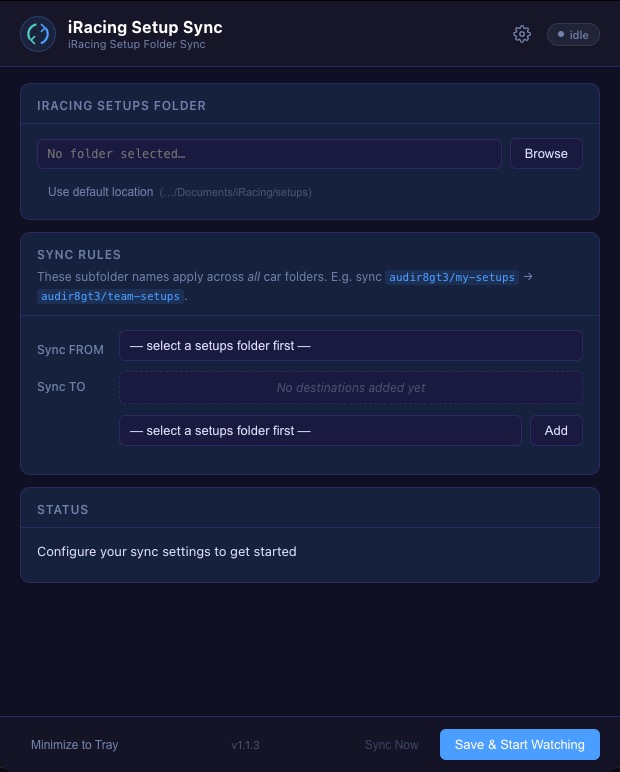
The app
Set a source folder. Set your destinations. Every setup file you save syncs instantly across all your car folders, automatically, in the background.
Runs in the background. Syncs the moment a file changes. Nothing to remember.
Detects changes the instant you save a setup file and copies it to all destination folders within milliseconds.
One rule covers every car. If you add a new car to iRacing, the sync rule applies automatically, no reconfiguration needed.
Add as many destination folder names as you need. Sync to a team folder, a backup, and a sharing folder simultaneously.
When the app starts, it performs a full sync pass first. Any files you saved while it wasn't running are caught up immediately.
Minimizes to the Windows tray. Shows sync status and last-synced time at a glance. Double-click to open settings.
Updates download silently in the background. Install when you're ready, or it installs automatically on next launch.
Three fields. One click.
Run the installer. iRacing Setup Sync starts in the system tray and launches automatically at Windows login.
Select your iRacing setups folder or use the default location detected automatically.
Pick the subfolder name to sync from, add one or more destination subfolder names, and hit Save.
The app runs in the background. Every setup you save in the source folder appears in all destinations instantly.
iRacing stores setups per-car in separate folders. If you keep setups in
my-setups
but want them automatically available in
team-setups
across every car, that's usually a manual copy job across dozens of folders.
Setup Sync watches for any change and replicates it everywhere in the background. The moment you save a new setup, it's already where you need it.
my-setups → team-setupsworking → race, backupdan → shared, archiveDownload iRacing Setup Sync and have it running in two minutes.
⬇ Download for Windows